Cook mode
Cook without touching your phone
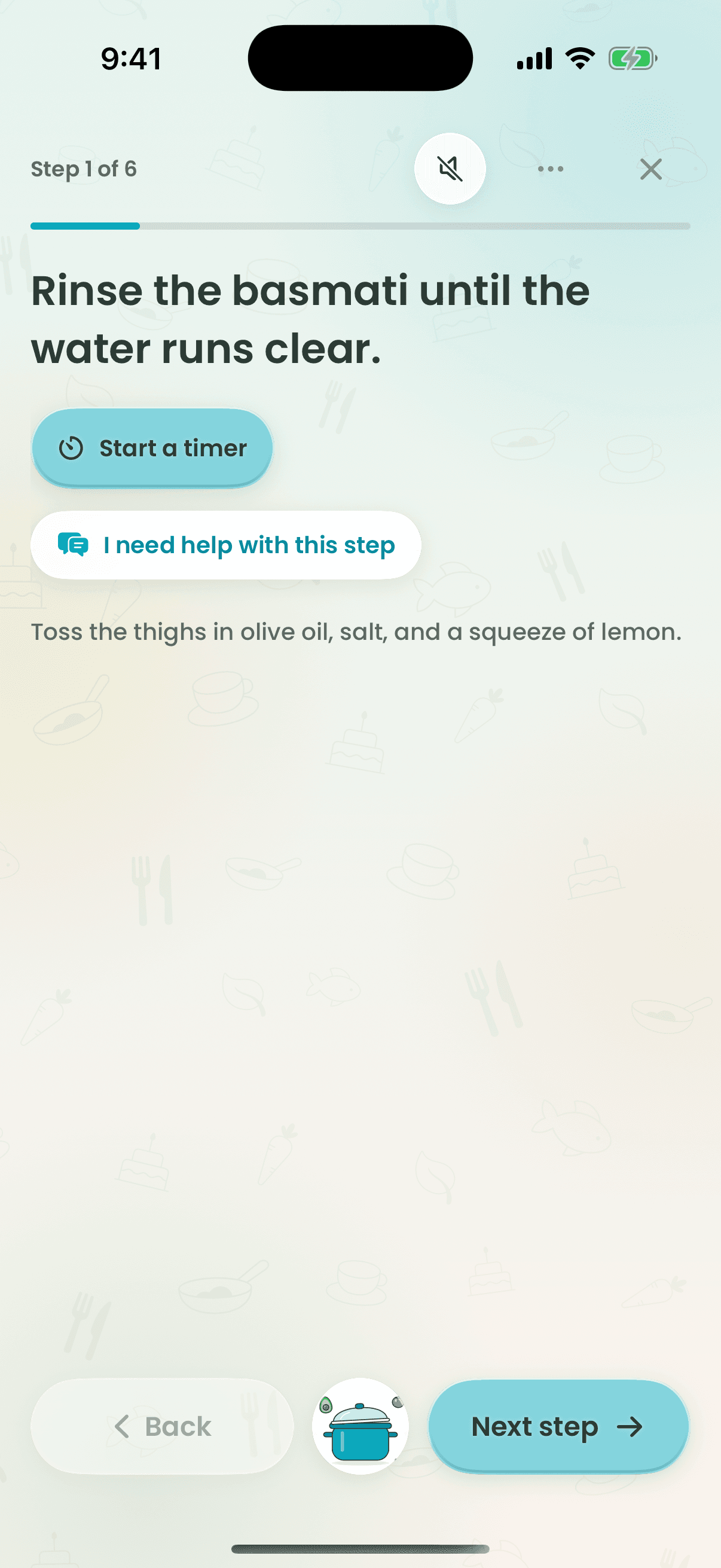
Cook mode walks you through one step at a time in big, readable text. Timers run on your Lock Screen, in the Dynamic Island and on your Apple Watch, and the screen stays awake so flour-covered hands never have to unlock anything.
How it works
- 1
Open a recipe and tap Start cooking.
- 2
Move through the steps one at a time.
- 3
Start a timer from the small pot — it follows you to the Lock Screen and Watch.
- 4
Finish to mark the dish cooked and rate it.
Why cooks love it
- Timers you can't miss
- Live on the Lock Screen and Apple Watch, with a gentle alert when they're done.
- Screen stays awake
- No unlocking with messy hands mid-recipe.
- On your wrist
- Steps and timers on Apple Watch, no phone required.
Questions
Does Recipe Wizard work on Apple Watch?
Yes. The Apple Watch app shows your current cooking step and timers, so you can cook without touching your phone.
Keep exploring
Tonight’s dinner is one tap away.
Free to start on iPhone, Apple Watch and the web.